"EPG not available for this channel" (or "No information", or an empty row in the guide) means one thing: the player looked for programmes for that channel in the TV guide it loaded, and found none. The stream itself may play perfectly. The guide is a separate file, and something between that file and that channel did not line up.
This page lists the six ways that happens, in the order worth checking, and how to tell which one is yours. The checks use your own playlist and your own guide file; nothing here adds a guide you do not have.
First: IPTV app or TV aerial?
The same words appear on ordinary TVs. If you watch through an aerial or a satellite dish (digital terrestrial, DVB-T or DVB-S), the broadcaster simply is not sending programme data for that channel right now. Retune the TV (a new channel scan) and wait a few hours; nothing on this page applies.
If you watch in an IPTV app on a phone, an Android TV, a Fire TV stick or a TV box, with a playlist or an Xtream login, read on.
How the guide finds a channel
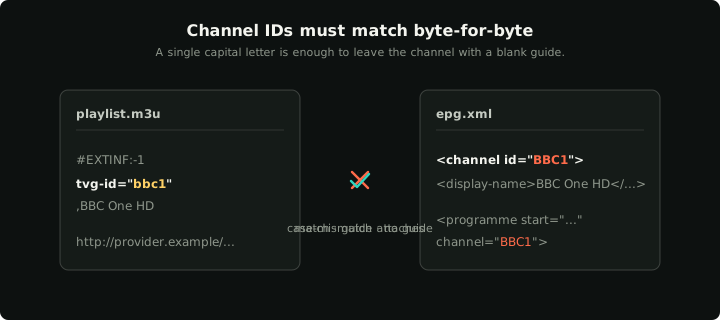
An IPTV guide is an XMLTV file: a list of channels, each with an id, and a list of programmes that point at those ids. Your playlist gives each channel a tvg-id. The player shows programmes for a channel only when its tvg-id matches a channel id in the guide, character for character, and when the guide has programmes for the current time.
So there are only two places to look: the playlist line of that channel, and the guide file.
The six causes, in order
1. No guide is loaded at all
Every channel says "not available", not just some. The player has no guide URL, or it could not download it. With an Xtream login, most players load the guide by themselves; with an M3U link you usually add the guide URL in a separate field. The Xtream ↔ M3U converter shows the guide link (xmltv.php) that belongs to your login.
2. The channel has no tvg-id
Open your playlist and find the #EXTINF line of that channel. If it has no tvg-id="…", or an empty one, the player cannot match it to anything. The M3U + EPG matcher lists these channels and suggests the matching guide id.
3. The tvg-id does not match the guide
This is the most common cause when only some channels are empty. News1, news1 and news1.uk are three different ids. Load your playlist and your guide into the matcher: it shows every channel whose id is missing from the guide, proposes the closest guide channel with a confidence score, and exports your playlist with the corrected ids.
4. The guide is out of date
The file loads and the ids match, but the guide's programmes ended yesterday. Players show nothing for a time the guide does not cover. Open the guide in the XMLTV viewer and look at the first and last programme dates. If the guide ends in the past, your player is showing an old copy or your provider's guide is not being updated; refresh the guide in the player, and if the file itself is old, tell your provider.
5. The channel is in the guide, with nothing on now
Some channels only get programme data for part of the day, or none at all, even in a correct guide. The viewer shows the programmes a channel has; if the list is empty or has a gap now, the guide simply does not describe that channel at this time.
6. The guide times are shifted
If the guide shows the programme from two hours ago, or goes blank at the edges of the day, the times are offset. That is a different problem with a different fix: see EPG showing the wrong times.
Checking with your own files
Both the matcher and the viewer work on files in your browser; nothing is uploaded. They open .xml and compressed .xml.gz guides.
To get the files on a phone or computer:
- The playlist: download it from your M3U link, or build the link from your Xtream login with the converter.
- The guide: open the guide link (
xmltv.php?…for an Xtream login) in the browser; it downloads the file. Then drop that file into the tool.
Both links contain your password. Download them on your own device and keep the files to yourself.
What only your provider can fix
A guide describes the channels its author chose. If a channel is not in your provider's guide at all, no player and no tool can invent its programmes: ask your provider whether a guide exists for it, or use a guide file you already have that does cover it. The same goes for a guide that has stopped updating.
In Klipa
Klipa matches the playlist's tvg-id to the guide on your device and shows now and next where the ids match. The guide in Klipa is an optional connected feature: when you turn it on, your guide link is sent to klipa.tv, which downloads and caches the schedule for the app. You can turn it off at any time, and the app works without it. See the privacy policy for details.