If your IPTV channel guide shows the right programmes but the wrong times — every show offset by an hour or two from when it actually airs — you're hitting one of the most stubbornly common XMLTV bugs in the wild. The fix is usually a one-line URL change. Diagnosing which way to shift takes about five minutes.
This guide walks through where the bug actually lives, how to figure out the offset you need, and how to apply it. The EPG timezone shifter on this site does the actual shift; this article explains how to use it correctly.
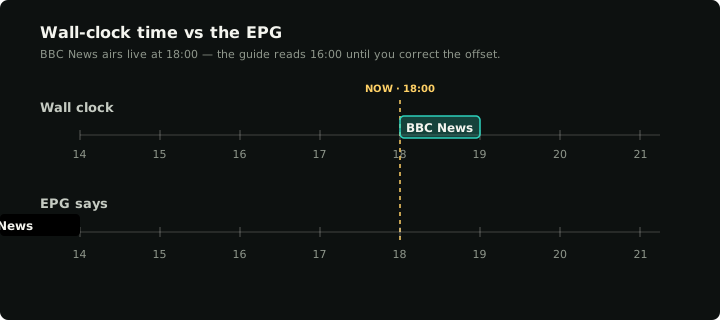
Same programme, two clocks: the EPG sits two hours behind wall-clock until the shifter realigns it.
Why XMLTV timezone bugs happen
XMLTV is a 25-year-old format. Every programme has a start and stop attribute that looks like this:
<programme start="20260507180000 +0000" stop="20260507190000 +0000" channel="twn1">
The 14 digits are the wall-clock time; the trailing +0000 is the timezone offset that wall-clock is in. So 20260507180000 +0000 means "18:00 UTC on May 7th, 2026". The player reads both, converts to your local timezone, and displays "20:00" if you're in CET.
This works if the XMLTV file is internally consistent. But XMLTV is generated by a long chain of programs:
- The original broadcaster's listing system, in their local timezone.
- A regional aggregator that maybe converts to a regional zone.
- The IPTV provider's scraper, which probably rounds it again.
- Your provider's XMLTV exporter, which slaps a
+0000on the end whether or not the digits are actually in UTC.
Any one of these steps can introduce a timezone mistake, and the format provides no checksum. The output file looks well-formed. The player can't detect that the digits inside don't match the offset claim. The result is a guide that's confidently wrong by some integer number of hours.
A second class of bug is when the XMLTV file omits the offset entirely:
<programme start="20260507180000" stop="20260507190000" channel="twn1">
Without the offset, the player has to guess. Most players assume "the digits are in your local time"; some assume UTC. If the provider intended UTC and your player assumes local, every programme will be off by your local offset.
In both cases, the underlying data is correct — the numbers just need to be added or subtracted to land in the right place.
Figuring out which offset you need
The fix is "add N hours to every timestamp in the XMLTV file". To pick N:
Step 1: Pick a single channel where you know what's on right now
Open the player. Find a channel currently showing live content where you actually know what it is — local news at 18:00, the Tidewater News at the top of the hour, prime-time on a major channel. The point is to have a known anchor: "this channel is showing X right now, at this exact wall-clock time on my watch".
Step 2: Look at what the EPG says
Look at the same channel's "now playing" entry in your player. Note the start time it claims. If it says the show started at 16:00 but it actually started at 18:00, the EPG is two hours behind — you need to add 2 to every timestamp.
If the EPG shows the show is "starting in two hours" but it's actually airing right now, the EPG is two hours ahead — you need to subtract 2.
Step 3: Confirm the same offset across multiple channels
Pick a second and third channel and verify the offset is consistent. If channel A is off by +2 and channel B is off by -3, you don't have a timezone problem; you have inconsistent data per channel and a fixed shift won't fix both. (Multi-channel inconsistency is rare and usually means the provider has merged feeds from multiple sources without harmonising timezones — the only fix there is to ask the provider to clean their data.)
For 95%+ of cases the offset is consistent across all channels and the value is one of: ±1, ±2, ±3, sometimes ±5 or ±8 for users in time zones distant from where the provider's source feed originates.
Applying the shift
Once you know the offset, the shifter tool gives you a new URL that delivers your provider's XMLTV with every timestamp shifted by exactly that much. Replace your player's EPG URL with the new one and the guide times line up.
Two practical points:
- The shifter is a proxy, not a one-shot. Your player will refresh the EPG every few hours. Each refresh re-fetches your provider's XMLTV through the shifter and re-applies the offset. There's no caching on our side; the upstream's authoritative data still wins, just with the times bumped.
- Your credentials go in the URL. Most IPTV providers ship XMLTV at a URL like
http://server/xmltv.php?username=...&password=.... The shifter reads those credentials only at request time to fetch the upstream — it doesn't log them, doesn't cache them, doesn't index them. The query string is also stripped before our access logs are written.
What the shifter doesn't fix
A few neighbouring problems look like timezone bugs but aren't:
Programmes drift in and out of sync
If the EPG is sometimes right and sometimes not, you're not looking at a timezone problem. Possibilities:
- The provider's data is stale. Older programme entries get refreshed on a slow cadence; newer ones come from a fresher feed. The two feeds may be in different timezones, mixed in the same XMLTV. Hard to fix without provider cooperation.
- DST. If your local timezone observes daylight saving but the provider's XMLTV doesn't (or vice versa), the offset changes by an hour twice a year. A fixed-offset shift only works for the half of the year you're calibrating for.
For DST issues specifically, you can keep two shifted URLs — one for each half of the year — and switch the player's EPG source twice a year. Annoying but works.
The guide is empty, not wrong
"No information" / blank guide is a different problem. See how to fix EPG not loading — the cause there is usually tvg-id mismatches between playlist and XMLTV, not timezone.
Specific channels are wrong but most are right
If everything else is right and only one or two channels are off, those channels' source data is wrong at the provider's end. The fixed shift will break the right channels to fix the wrong ones. Either ask the provider to fix the data, or accept that those specific channels' times will be approximations.
Why we don't auto-detect the offset
The shifter takes the offset as an explicit parameter rather than trying to figure it out. We could, in theory, fetch the file, compare programme start times against "now", and guess. We don't because:
- The "right answer" depends on which channel you anchor on. Different channels could disagree.
- A wrong auto-guess is worse than asking. If we silently shift by the wrong amount, you get a guide that's consistently wrong by a different value, and you'll waste time debugging.
- The user has the context. They know "the Tidewater One news at 18:00 is currently showing as 16:00 in the guide". The tool can apply that knowledge in one click; deriving it from network observation is unreliable.
After the fix
Verify with one more pass through Step 1 above: known channel, current programme, check the player's now-playing time. It should now match wall-clock. If it does, the fix is permanent — your player will keep refreshing through the shifter URL and the offset stays applied.
If something else is still wrong (channels that didn't shift, mismatched IDs, gaps in coverage), those are separate problems and pointing at the EPG validator is the next step. The validator parses an XMLTV file and reports structural problems independent of timing — useful when you want to know "is the file itself well-formed" rather than "are the times right".
For everything else IPTV-side, the Xtream credentials checker and M3U playlist tester cover the playlist and credential edges. Together with the timezone shifter, those four tools handle most of the troubleshooting people end up doing in the dark on forums.