If your IPTV provider sent you an Xtream login (server, username, password) but the player you're trying to use only takes a single M3U URL — or vice versa — you're not stuck. The two are the same thing. Underneath, an Xtream login is just a tidy way of writing down everything an M3U URL already contains.
This guide explains the conversion in both directions, what to watch out for, and how to do it without typing your credentials anywhere a stranger can read them. The Xtream ↔ M3U URL converter on this site does the conversion entirely in your browser — there is no server endpoint behind that page.
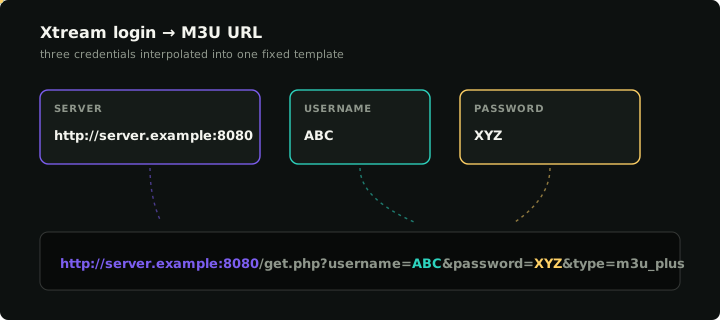
The M3U URL is a fixed template; an Xtream login is just the three credentials slotted into it.
Why the conversion comes up at all
The same provider almost always supports both forms, but the player you happen to install will only ask for one of them. Apps disagree on a few specific points:
- Old-school M3U-only players (VLC, basic Smart TV apps, dedicated IPTV boxes) take a single URL. They don't know about Xtream's API endpoints; they download a flat playlist file and play streams from it.
- Xtream-aware players (most modern IPTV apps, including Klipa) prefer the credential triple. They use it to fetch the live channel list, the VOD library, the series catalog, and the EPG as separate documents — nicer categorisation, dynamic refresh, on-demand sections that the M3U export can't represent.
If your provider gave you one and the player wants the other, conversion is a 30-second operation. You don't need to ask the provider for "the other format" — they're already giving you both, just in one shape.
The Xtream-to-M3U formula
Every Xtream provider uses the same URL template. Once you know it, you can build the M3U URL from the credentials by hand:
http://<server>:<port>/get.php?username=<USERNAME>&password=<PASSWORD>&type=m3u_plus&output=mpegts
Three concrete examples, given the credentials server: http://server.example:8080, username: ABC, password: XYZ:
M3U:        http://server.example:8080/get.php?username=ABC&password=XYZ&type=m3u_plus&output=mpegts
EPG:        http://server.example:8080/xmltv.php?username=ABC&password=XYZ
player_api: http://server.example:8080/player_api.php?username=ABC&password=XYZ
The parts:
get.phpis the playlist endpoint. Always calledget.php— there is no provider-specific naming convention here.type=m3u_plusasks for the extended M3U format that includes channel logos and group titles. Plaintype=m3uworks too but produces a thinner playlist; you almost always wantm3u_plus.output=mpegtsasks for streams that play in raw MPEG-TS. The other common option isoutput=hls, which produces HLS (.m3u8) URLs — useful for browsers and some Apple devices, less universally supported on TV boxes. If your player is fussy, switchingoutputis the first thing to try.xmltv.phpis the EPG endpoint. Same credentials, separate document. Most players take this URL in a different field ("EPG URL" or "XMLTV URL").player_api.phpis the JSON API. Players that "speak Xtream natively" use this to get the live/VOD/series trees and channel logos.
The reverse: extracting credentials from an M3U URL
Given an M3U URL that looks like the formula above, you can read the three Xtream fields straight back out:
http://server.example:8080/get.php?username=ABC&password=XYZ&type=m3u_plus
                                            └────┘          └────┘
                                          username        password
- Server is everything before the first slash after the host:
http://server.example:8080. Strip the/get.phpand everything after it. - Username is the value of the
usernamequery parameter. - Password is the value of the
passwordquery parameter.
If a query parameter is missing, the URL isn't in the standard Xtream format. Some providers ship plain M3U URLs that don't have credentials in them at all — typically static or token-based playlists where the URL itself is the secret. There's nothing to extract from those; you simply use the URL as-is in any M3U-capable player.
Common gotchas
A few details routinely trip people up.
URL encoding of special characters
If your password contains characters like &, =, +, #, %, or /, they have to be percent-encoded inside the URL. A literal & in the middle of the password breaks the URL parse — the player would treat everything after it as a separate query parameter.
Most provider control panels do this for you. If you're constructing the URL by hand and your password has anything weird in it, run the password through any "URL encode" tool first. Or skip it entirely and let the in-browser converter do it for you.
The port
Xtream providers very rarely run on the default ports 80 or 443. Common ones are 8080, 25461, 8000, or some random high port. The port is part of the server URL, not optional. If you see http://server.example/get.php?… with no port, it's either using port 80 (rare) or the provider has a reverse proxy in front (also rare). Most of the time the port is just missing because someone copied the URL by hand and dropped it.
http vs https
Most Xtream providers serve HTTP, not HTTPS. The https:// form often returns a certificate error or a 404 because the server doesn't bind TLS at all. If you've been handed a server URL with https:// and it doesn't work, try plain http://. The trade-off is that your password now travels unencrypted; this is unfortunately the norm for IPTV providers.
Custom path on the M3U URL
Some providers customize their routing — instead of /get.php, you'll see /playlist.m3u, /m3u.php, or even /index.php?type=m3u. The credentials inside those URLs still match what the Xtream API expects, so the converter will extract them correctly, but the playlist URL the provider uses is non-standard. If you build your own M3U URL using the standard /get.php path, the provider may reject it. For these cases, keep the original URL the provider gave you — don't try to "fix" it.
Trailing whitespace in the credentials
Pasting from email or a forum post regularly drags an invisible trailing space, newline, or non-breaking space onto the username. The Xtream API treats ABC and ABC as different usernames; you'll get an authentication-failed response that looks identical to a wrong password. The converter trims whitespace from the username automatically and warns you when it had to. If you're constructing the URL by hand, paste each field into a plain text editor first and visually check the end.
Doing the conversion safely
Several websites offer this conversion online. Most of them are fine; some are sketchy. The risk is straightforward — credentials pasted into a stranger's form may be logged, harvested, or replayed. Even an honest operator with no malicious intent has access logs.
The converter on this site is built so it can't have access logs about your credentials, because there's no server endpoint behind it. The conversion runs entirely in your browser as JavaScript. The credentials live in DOM input elements until the page is closed; they're not in the URL bar, they're not in localStorage, and they're not sent anywhere. If you open the browser's network tab during a conversion, you'll see exactly zero outbound requests carrying the credentials.
That's the standard you should expect from any tool that asks for IPTV credentials. If a converter UI sends a network request when you click "convert", it has, by definition, transmitted your credentials somewhere.
After you've converted: verify before importing
A successfully built URL doesn't mean a working URL. Both directions of conversion are deterministic string transformations — they're correct as transformations, but they don't tell you whether the credentials are valid, the subscription is current, or the server is reachable.
Two cheap checks before you commit to importing:
- For M3U URLs, paste the result into the M3U playlist tester. It fetches the playlist, parses it, and probes the first 100 streams. Anything green means the URL is good; anything red tells you the specific failure mode (HTML response, 404, dead streams).
- For Xtream credentials, paste the triple into the Xtream credentials checker. It calls the API server-side, returns auth status, expiry, connection limits, and channel counts. Distinguishes "wrong password" from "expired subscription" from "server unreachable".
Running one of these before you bother installing a player saves about twenty minutes of debugging when something is wrong with the credentials themselves.
When the M3U URL contains no credentials
A small fraction of M3U URLs you'll encounter aren't Xtream at all. They're flat playlists hosted on a static server, or token-bearer URLs where the secret is baked into the path rather than the query string:
https://server.example/playlists/9c1f4a8b3e/stream.m3u8
There's nothing to extract — the URL itself is the credential. These work in M3U-only players exactly as-is. They don't have an Xtream-equivalent representation because they aren't generated by the Xtream Codes panel; they come from a different (older) IPTV stack. If your provider gave you only this and your player insists on Xtream credentials, they don't have an Xtream login to give you. Ask the provider, or pick a player that accepts M3U URLs.
What this looks like in Klipa
Klipa accepts both forms in the same library, side by side. You can add an M3U URL and an Xtream login from the same provider as separate sources; the app uses whichever is healthy. If the M3U export starts returning HTML one day, the Xtream API call keeps your channel list alive until the next refresh, and vice versa.
That's the simple answer to "which format should I use" — both. If you're picking only one, the Xtream-vs-M3U comparison covers when to lead with which.