Few things in IPTV are as exasperating as pasting a username and password you know are correct and watching the player return "Authentication Failed". Two facts make this worse than it should be:
- The error is the same string for at least eight different underlying causes, several of which have nothing to do with your credentials.
- Players almost never tell you which one it is.
This guide walks you through them in the order they're worth checking. The Xtream login check settles the first three in one step: it tells you whether the login failed, has expired, or has every connection in use. (That tool sends your login to klipa.tv to ask your provider's server; it is not stored or written to logs.)
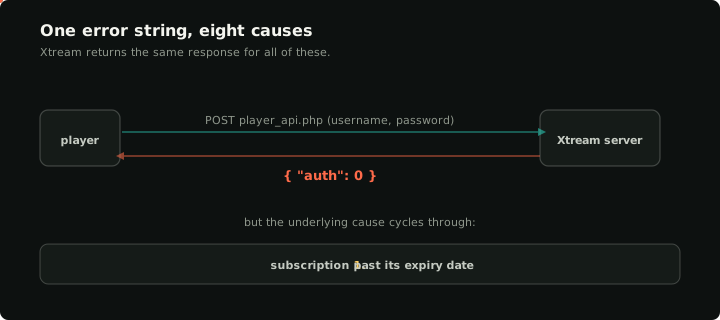
One error string, eight underlying causes — the player can't tell them apart, so the diagnostic is yours.
1. The subscription is past its expiry date
This is the single most common cause, and it doesn't look any different from a wrong password in most players. Xtream returns the same auth: 0 response either way.
The fix is to ask your provider for the new expiry — or, if you've already renewed, wait an hour and try again. Some provider control panels update the database on a schedule, not in real time, and a freshly-renewed account can still report as expired for half an hour after payment clears.
The credentials checker will return auth: expired here, so you can rule this out in one click.
2. The connection limit is full
Most Xtream subscriptions are sold with a connection cap — typically 1, 2, 3, or 5 simultaneous connections. If all of them are in use, a new login attempt is rejected with the same auth error as a wrong password.
The trap: a connection isn't always actively streaming. Players that exit without cleanly disconnecting (most do) can leave a "ghost" connection that the provider only cleans up after a timeout. If you've recently switched devices, restarted a TV, or had Wi-Fi drop and reconnect, it's plausible that all your slots are occupied by ghosts that aren't actually streaming anything.
The fix: close the app on your other devices, wait 5–10 minutes for the server to drop the stale connections, and try again. Or ask your provider to clear the active connections on your account.
If connections are in use while none of your devices is playing anything, someone else may be using your login. Change your password with your provider.
3. The username has a hidden whitespace character
Pasting credentials from email, a forum, or a screenshot frequently includes invisible characters: a leading space, a trailing newline, a non-breaking space (U+00A0) where the user thinks they typed a regular space. Most players don't trim these, and a username with a single trailing newline is a different username from the provider's perspective.
To check, paste the username and password into a plain text editor. Move the cursor to the very end of each. If you can backspace and delete an invisible character before the cursor sits at the end of the visible text, that's your problem.
The Xtream ↔ M3U converter trims stray spaces from the server and username and tells you when it did, which makes this easy to spot.
4. The server URL has a trailing path or extra query string
Xtream Codes calls a single endpoint at /player_api.php. Your player constructs the full URL by appending that path to whatever you put in the "server" field. If you pasted the full M3U URL (http://server.example/get.php?username=…&password=…&type=m3u_plus) into the server field instead of just http://server.example, the player ends up calling /get.php?username=…&password=…&type=m3u_plus/player_api.php?…, which any server will return either 404 or HTML for. The player then reports "auth failed" because it didn't get JSON back.
The fix is to strip the URL down to just http(s)://host:port. The username and password go in their own fields. Many users have copied the M3U URL into the server field at least once. Pasted the whole link? Paste it into the converter and it splits it into server, username and password for you. More on the field itself in what the Xtream server URL is.
5. The server is HTTPS but the cert chain is broken
Some providers run their Xtream API on a self-signed or expired certificate. Most modern players refuse to talk HTTPS to a server with an invalid cert, but some older ones silently downgrade to HTTP and then fail because the provider stopped serving HTTP last quarter.
The diagnostic: open the server URL in a desktop browser. If you see a certificate warning, the player is hitting it too. Use exactly the address your provider gave you, and tell them their certificate is invalid: renewing it is their job, and only they can fix it.
6. The server is refusing your connection
Servers limit how often one login may try to sign in. After several failed attempts in a row, many refuse every new attempt for a while, and that refusal looks exactly like a wrong password. Stop retrying, wait about ten minutes, fix the cause you found above, and try once more.
Some networks also block IPTV servers because a court or a regulator ordered it. That is not something to work around: only your provider or your network operator can resolve it, so ask them.
"Too many Xtream requests failed"
That exact message comes from one open-source desktop player, which shows it after several failed logins in a row. It is not a separate problem: the cause is one of the others on this page, and waiting before the next attempt is part of the fix.
7. The provider's database is in maintenance / migration
Periodic provider migrations break Xtream login for hours at a time. Symptoms: every Xtream account on the same provider returns auth-failed simultaneously. There's no way to distinguish this from your own credentials being revoked except by waiting and retrying, or by asking on a forum where other customers of the same provider have noticed it.
If you have an M3U URL in addition to Xtream credentials (most providers issue both), the M3U often keeps working through the migration because it's served from a different code path. Switching to the M3U URL is a fast workaround until the API comes back.
8. The credentials really are wrong
This is the boring case but it's still real. The provider invalidated them. The provider rotated them after a payment incident. You're using last month's credentials and got a new set when you renewed.
How to tell: log into your provider's customer portal (almost every Xtream provider has one) and copy the credentials displayed there into the form. If those work and the credentials you've been using don't, you have your answer.
How the login check fits in
The Xtream login check on this site tells cases 1, 2 and 8 (the most common ones) apart. It sends your login to klipa.tv, which asks your provider's server once; nothing is stored or written to logs.
- Login works → the login is fine. Look at the server field in your player (case 4) and at your player itself.
- Expired → case 1. Contact your provider.
- Failed → case 8, or the server is refusing attempts for now (case 6). Wait, then check the details once more.
- Every connection in use → case 2. Close the other streams and wait.
- Server not reachable → the server is down or in maintenance (case 7). Try again later.
Running the check once before debugging your player saves a lot of guessing.
What to do once you know the cause
For a login that genuinely works, Klipa supports both the Xtream login and the M3U URL side by side in the same library. If your provider's Xtream API is flaky but the M3U export is healthy, add both: one keeps your playlist working when the other breaks. See the Xtream-vs-M3U comparison for which interface to lead with.
If you've been through all eight cases and the login still doesn't work, including in the login check and in your provider's customer portal, the issue is on the provider's side and there's nothing more to debug from yours.